> For the complete documentation index, see [llms.txt](https://partner-docs.covergenius.com/llms.txt). Markdown versions of documentation pages are available by appending `.md` to page URLs; this page is available as [Markdown](https://partner-docs.covergenius.com/offers/vertical-examples/product-retail.md).
# Product / Retail
Product Insurance or Warranties
Retail platforms and marketplaces can seamlessly present relevant warranty and insurance policies in the purchase path.\
\
Commonly, partners will integrate XCover using two key purchase process API calls: [create offer](/offers/guides/purchase-workflow-overview/create-offer.md) and [confirm offer](/offers/guides/purchase-workflow-overview/confirm-offer.md). Depending where the offer of insurance is provided (at product page, cart page, or between as a product is added to cart), a single product offer or bundled offer can be used.\
\
:bulb: See a collection of common requests for this integration type, by contacting your CSE.\
\
Most integrations follow the below high-level flow of events:
1\. User browses product options and;\
2\. Selects a product to cart (or arrives at a product page etc.)\
3\. Partner platform sends an [offer payload](/offers/guides/purchase-workflow-overview/create-offer.md) to the create offer endpoint\
4\. User selects offer products\
5\. User pays for product/s and offer at checkout\
6\. [Payment collection](/offers/guides/payment-process.md)\
7\. Partner sends a [confirmation request](/offers/guides/purchase-workflow-overview/confirm-offer.md) to the confirm offer endpoint\
8\. XCover sends confirmation email including policy details, Partner sends purchase confirmation and tax invoice.
**In-Store CG Portal Process**
For in-store purchases, sales associates can utilize the Cover Genius Portal on an iPad or similar device. The online form requires a few details about the product and some customer and payment information to protect a customer's purchase(s).
#### Post sale processes
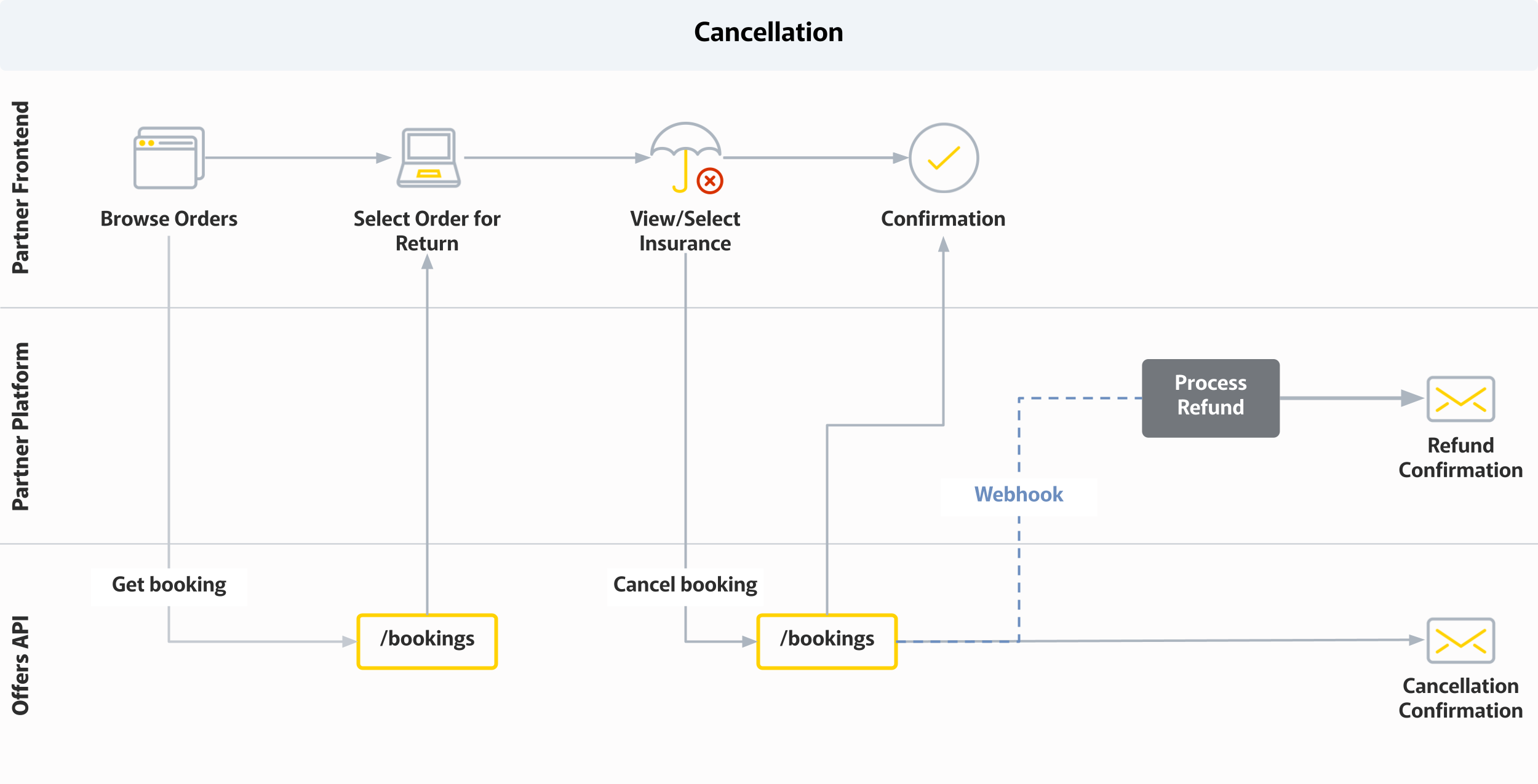
[Cancellation](/offers/guides/purchase-workflow-overview/cancel-booking.md)\
Should a partner need to facilitate policy cancellation (for example, a product return, or order cancellation), the below workflow should be referenced.
#### Opt-out process
In circumstances where a customer chooses to purchase products, but not the insurance offer. An opt-out request is used to notify XCover of a non-opted insurance offer. This assists with pricing and product offer data analysis and ultimately improved offers and sales results.
---
# Agent Instructions
This documentation is published with GitBook. GitBook is the documentation platform designed so that both humans and AI agents can read, navigate, and reason over technical content effectively. Learn more at gitbook.com.
## Querying This Documentation
If you need additional information that is not directly available in this page, you can query the documentation by asking a question.
Perform an HTTP GET request on the following URL with the `ask` and `goal` query parameters:
```
GET https://partner-docs.covergenius.com/offers/vertical-examples/product-retail.md?ask=&goal=
```
`ask` is the immediate question: it should be specific, self-contained, and written in natural language.
`goal` is what the user is ultimately trying to achieve, the reason they need the answer. Sharing it helps GitBook give you a better, more relevant answer. A goal is most helpful when it describes the outcome the user wants rather than restating the question. For example, with `ask=how do I create an API token`, a goal like `automate deployments from our CI pipeline` lets GitBook tailor the answer to that use case.
The response will contain a direct answer to the question and relevant excerpts and sources from the documentation.
Use this mechanism when the answer is not explicitly present in the current page, you need clarification or additional context, or you want to retrieve related documentation sections.
.png?alt=media)
.png?alt=media)