> For the complete documentation index, see [llms.txt](https://partner-docs.covergenius.com/llms.txt). Markdown versions of documentation pages are available by appending `.md` to page URLs; this page is available as [Markdown](https://partner-docs.covergenius.com/offers/vertical-examples/events-tickets.md).
# Events / Tickets
Event cancellation insurance or warranties - Offered via event or ticket booking platforms
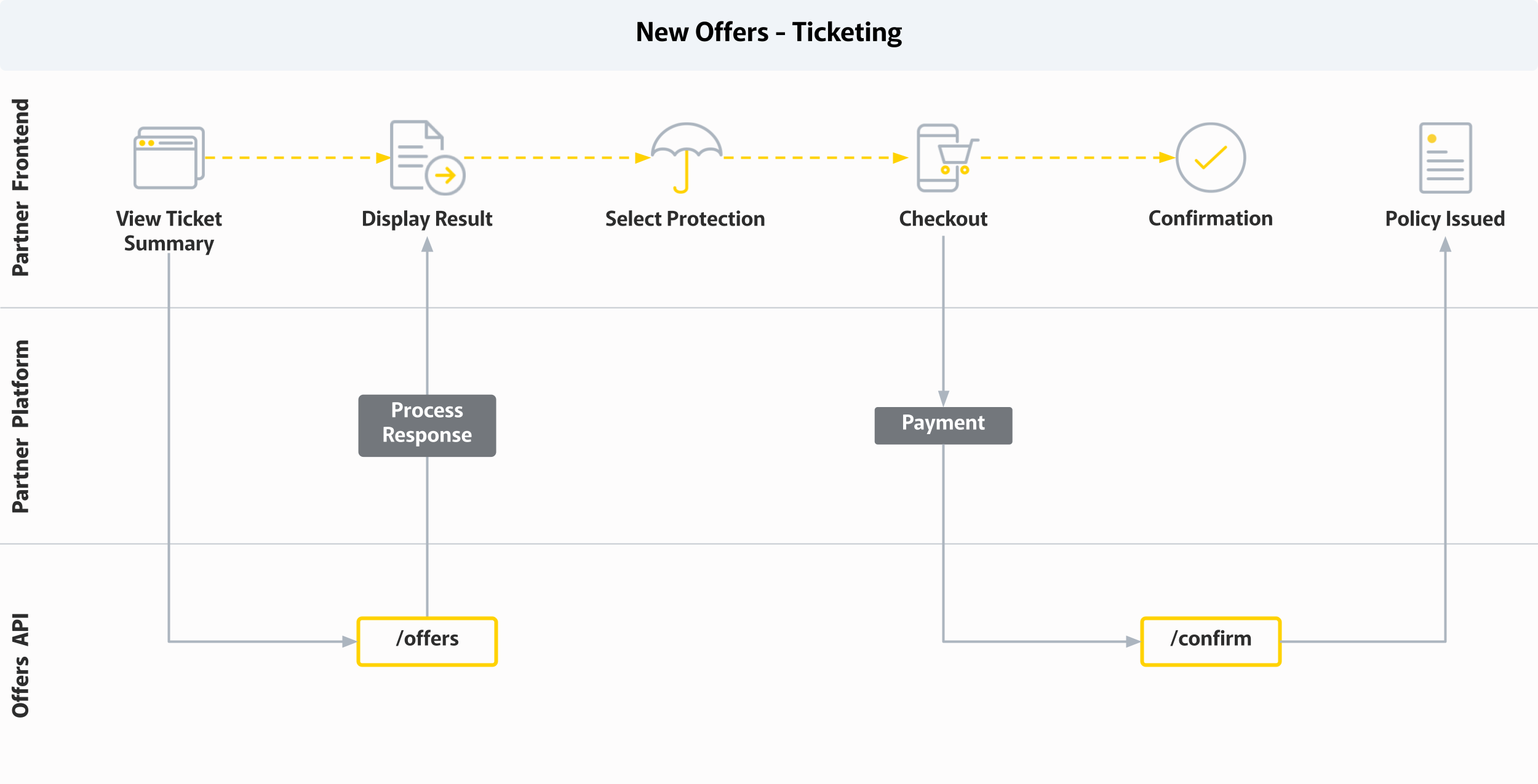
Ticket and event sales services can present relevant cancellation insurance or ticket warranty policies in the event purchase booking path. Commonly, partners will integrate XCover using two key purchase process API calls: [create offer](https://partner-docs.covergenius.com/offers/api/reference/create-offer#post-partners-partner_code-offers) and [confirm offer](https://partner-docs.covergenius.com/offers/api/reference/confirm-offer#post-partners-partner_code-offers-offer_id-confirm).\
\
See a collection of common requests for this integration type, by contacting your CSE.\
\
Most integrations follow the below high level flow of events:
1\. User browses event options and\
2\. Selects a event/ticket package\
3\. Partner platform sends an [offer payload](https://partner-docs.covergenius.com/offers/api/reference/create-offer#post-partners-partner_code-offers) to the create offer endpoint\
4\. User selects offer products\
5\. User pays for tickets and offer products at checkout\
6\. [Payment collection](/offers/guides/payment-process.md)\
7\. Partner sends a [confirmation request](https://partner-docs.covergenius.com/offers/api/reference/confirm-offer#post-partners-partner_code-offers-offer_id-confirm) to the confirm offer endpoint\
8\. XCover sends confirmation email including policy details and partner sends purchase confirmation and tax invoice.
#### Post sale processes
[Modification](/offers/guides/purchase-workflow-overview/modify-booking.md) - Only non financial modifications are applicable for this policy type.
[Cancellation](/offers/guides/purchase-workflow-overview/cancel-booking.md) - Due to the nature of event/cancellation policies cancellations are restricted in line with relevant regulations.
#### [Opt-out process](/offers/guides/purchase-workflow-overview/opt-out-offer.md)
In circumstances where a customer chooses to purchase tickets, but not the insurance offer. An opt-out request is used to notify XCover of a non-opted insurance quote. This assists with pricing and product offer data analysis and ultimately improved offers and sales results.
---
# Agent Instructions
This documentation is published with GitBook. GitBook is the documentation platform designed so that both humans and AI agents can read, navigate, and reason over technical content effectively. Learn more at gitbook.com.
## Querying This Documentation
If you need additional information that is not directly available in this page, you can query the documentation by asking a question.
Perform an HTTP GET request on the following URL with the `ask` and `goal` query parameters:
```
GET https://partner-docs.covergenius.com/offers/vertical-examples/events-tickets.md?ask=&goal=
```
`ask` is the immediate question: it should be specific, self-contained, and written in natural language.
`goal` is what the user is ultimately trying to achieve, the reason they need the answer. Sharing it helps GitBook give you a better, more relevant answer. A goal is most helpful when it describes the outcome the user wants rather than restating the question. For example, with `ask=how do I create an API token`, a goal like `automate deployments from our CI pipeline` lets GitBook tailor the answer to that use case.
The response will contain a direct answer to the question and relevant excerpts and sources from the documentation.
Use this mechanism when the answer is not explicitly present in the current page, you need clarification or additional context, or you want to retrieve related documentation sections.