> For the complete documentation index, see [llms.txt](https://partner-docs.covergenius.com/llms.txt). Markdown versions of documentation pages are available by appending `.md` to page URLs; this page is available as [Markdown](https://partner-docs.covergenius.com/offers/guides/purchase-workflow-overview/confirm-offer.md).
# Confirm Offer
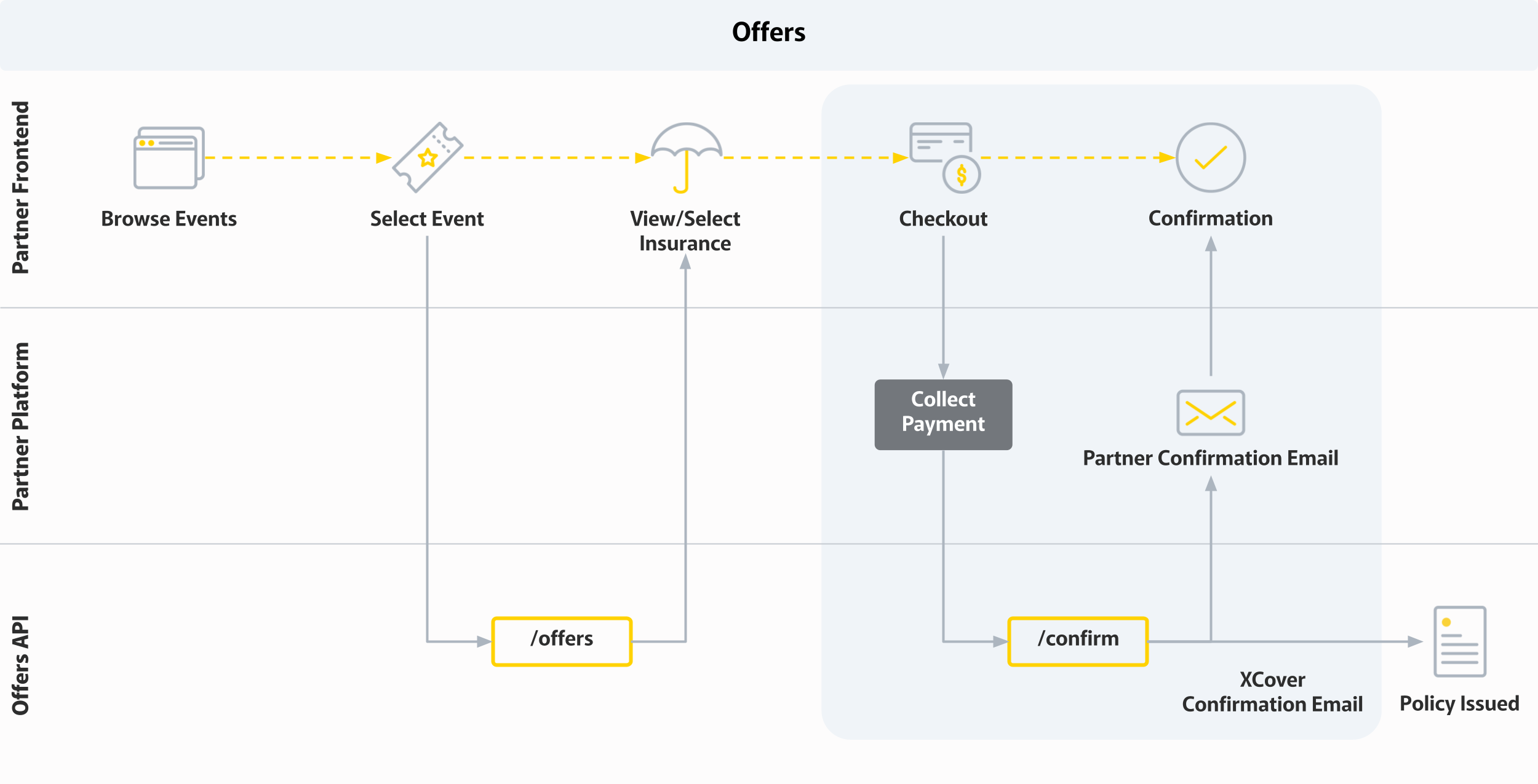
Booking process overview
The Confirm Offer endpoint is used to finalize the purchase of Product(s) from a previously created Offer. This endpoint converts the selected offer into a confirmed booking after payment has been successfully collected.
### When to Use Confirm Offer
After a customer has:
1. Received an Offer from the Create Offer endpoint
2. Reviewed the Product details, pricing, and policy information
3. Completed the checkout process with payment successfully collected
You must make a request to the Confirm Offer endpoint to provision the product and distribute confirmation to the customer.
### Making a Confirm Offer Request
The Confirm Offer endpoint requires:
#### Path Parameters
* `partner_code` - Your partner identifier
* `offer_id` - The Offer ID returned from the Create Offer response
#### Request Body
* **quotes** (required) - Array of quote objects to confirm, each containing:
* `id` (required) - The product ID (quote ID) from the Offer response
* `insured` (optional) - List of insured persons if required by the policy
* `instalment_plan` (optional) - Selected instalment plan name
* `first_instalment_paid` (optional) - Whether first instalment has been paid
* **policyholder** (required) - Policyholder information:
* `email` (required) - Policyholder's email address
* `phone` (required) - Policyholder's phone number
* `first_name` (required) - Policyholder's first name
* `last_name` (required) - Policyholder's last name
* `country` (required) - Policyholder's country code
* Additional fields as required by the policy (e.g., city, postcode, region)
* **partner\_transaction\_id** (optional) - Your internal transaction identifier
* **payment\_details** (optional) - Payment information:
* `provider` - Payment provider name (e.g., "stripe", "paypal", "xpay")
* `transaction_id` - Payment transaction ID
* `xpay_charge_id` - XPay charge ID if using XPay
* `xpay_customer_id` - XPay customer ID if using XPay
* `customer_token_id` - Customer token for payment authorization
* **booking\_agent** (optional) - Agent information if booked through an agent
### Validations
When confirming an Offer, the following validations are performed:
1. **Status Validation:** The Offer must be in a valid state for confirmation. The expected status after a successful confirmation is `CONFIRMED`.
2. **Price Validation:** The final price is validated to ensure it matches the price from the Create Offer stage. Any price discrepancies will result in an error.
3. **Error Detection:** The presence of an `errors` object in the response payload indicates an important logic error during booking that should be investigated.
### Response Status Codes
* **HTTP 200 OK** - Offer successfully confirmed and policy provisioned
* **HTTP 400 BAD REQUEST** - Invalid request format
* **HTTP 404 NOT FOUND** - Offer not found or partner not found
* **HTTP 409 CONFLICT** - Offer already confirmed
* **HTTP 422 UNPROCESSABLE ENTITY** - Validation error or booking failed
* **HTTP 423 LOCKED** - Resource is locked (concurrent modification)
### Important Notes
> **Policy Confirmation:** An Offer with status `CONFIRMED` is considered booked, sold, and provisioned. The policy confirmation will be automatically submitted to the customer via email.
> **Payment Collection:** You must collect payment from the customer BEFORE calling this endpoint. The Confirm Offer endpoint does not process payments—it only records that payment has been collected.
> **Quote ID Usage:** The `id` field in the quotes array must match the product `id` from the Create Offer response. This is the quote ID, not the Offer ID.
>
> If the integration involves multiple quotes per product, then we have to make sure to send through every product `id` sharing the same `product_config_id` from the Create Offer response.
### Relationship to Fast Booking
The Confirm Offer endpoint uses the same underlying logic as the Fast Booking endpoint. The key difference is:
* **Fast Booking** - Confirms quotes from a Fast Quote request
* **Confirm Offer** - Confirms quotes from a Create Offer request
Both endpoints accept the same request structure and return the same response format.
### Error Handling
If the confirmation fails:
* Check the `errors` field in the response for specific error details
* Verify that the Offer ID is valid and not expired
* Ensure all required fields are provided in the request
* Confirm that payment was successfully collected before calling this endpoint
* Check that the quote IDs match those returned in the Create Offer response
### **Consistent error bodies**
Confirm Offer supports the opt-in `X-API-Error-Version: v2` header, which returns every error response from this endpoint in one consistent shape. We recommend all new integrations send it.
For example, when none of the requested quotes could be booked, the response is a `422` with the package-level code `booking_quotes_unsuccessful` and one `booking_quote_failed` entry per quote. `error_id` is the Offer ID:
```json
{
"type": "validation_error",
"message": "None of the requested quotes were successful.",
"code": "booking_quotes_unsuccessful",
"error_id": "5d8a2f61-9c04-4e73-b1a8-3f6e7c0d9b42",
"errors": [
{
"product_config_id": "8f2b41c9-6d7e-4a15-b3c8-1e9f0a2d5b76",
"quote_id": "3c7d9e21-5b48-4f0a-8d16-2a9c4e7b0f53",
"code": "booking_quote_failed",
"details": ["Policyholder country is not eligible for this product"]
}
],
"metadata": {}
}
```
See [Error Versioning](/offers/api/responses/error-versioning.md) for the full field reference and error code list.
### Next Steps
After successful confirmation:
1. Store the booking ID (`id` field with format `XXXXX-XXXXX-INS`) for future reference
2. Display the confirmation to the customer
3. The customer will receive a confirmation email with policy documents
4. Use the booking ID for any future operations (cancellations, modifications, etc.)
---
# Agent Instructions
This documentation is published with GitBook. GitBook is the documentation platform designed so that both humans and AI agents can read, navigate, and reason over technical content effectively. Learn more at gitbook.com.
## Querying This Documentation
If you need additional information that is not directly available in this page, you can query the documentation by asking a question.
Perform an HTTP GET request on the following URL with the `ask` and `goal` query parameters:
```
GET https://partner-docs.covergenius.com/offers/guides/purchase-workflow-overview/confirm-offer.md?ask=&goal=
```
`ask` is the immediate question: it should be specific, self-contained, and written in natural language.
`goal` is what the user is ultimately trying to achieve, the reason they need the answer. Sharing it helps GitBook give you a better, more relevant answer. A goal is most helpful when it describes the outcome the user wants rather than restating the question. For example, with `ask=how do I create an API token`, a goal like `automate deployments from our CI pipeline` lets GitBook tailor the answer to that use case.
The response will contain a direct answer to the question and relevant excerpts and sources from the documentation.
Use this mechanism when the answer is not explicitly present in the current page, you need clarification or additional context, or you want to retrieve related documentation sections.