> For the complete documentation index, see [llms.txt](https://partner-docs.covergenius.com/llms.txt). Markdown versions of documentation pages are available by appending `.md` to page URLs; this page is available as [Markdown](https://partner-docs.covergenius.com/offers/guides/purchase-workflow-overview/cancel-booking.md).
# Cancel Booking
Cancel a specific policy booking
Cancelling a policy booking is used when a customer no longer requires coverage and has contacted the partner directly to cancel the policy. This endpoint handles the cancellation process and calculates any applicable refunds.
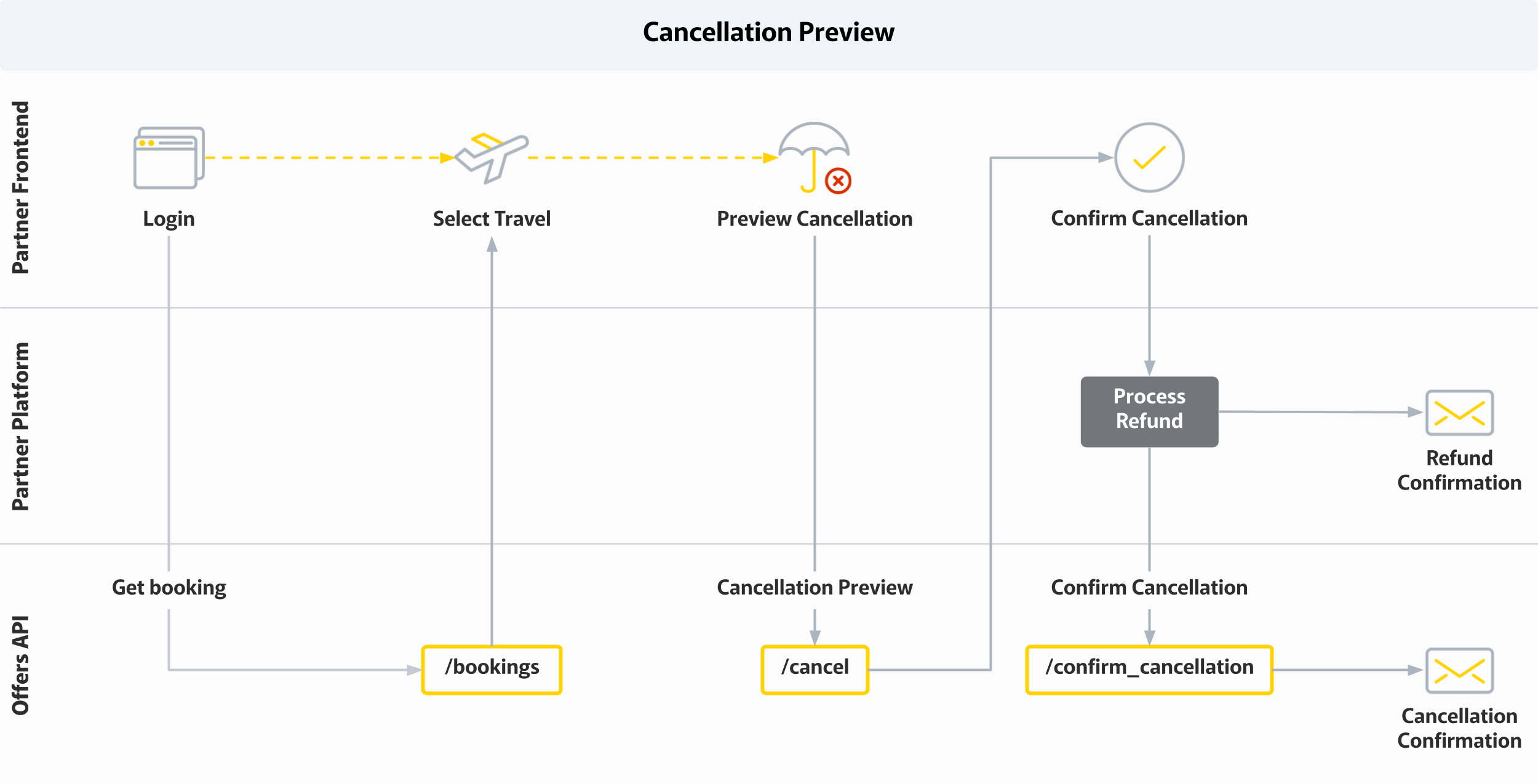
Cancellation Workflow
### Use Cases
Common cancellation scenarios include:
* **Product Insurance** - Product is on-sold or no longer needed
* **Travel Insurance** - Trip is cancelled or postponed indefinitely
* **Event Insurance** - Event is cancelled
* **General Cancellation** - Customer no longer requires coverage for any reason
### Cancellation Workflow
#### Step 1: Booking Retrieval
First, obtain information about the customer's purchased insurance. This step can be skipped if you have stored all relevant information such as:
* INS number (booking ID)
* Quote IDs
* Price paid
* Policy start and end dates
Use the GET `/partners/{partner_code}/bookings/{booking_id}` endpoint to retrieve current booking details if needed.
#### Step 2: Preview Cancellation (Optional but Recommended)
Before cancelling, you can preview the cancellation by calling this endpoint with `preview: true` in the request body to:
* Calculate the pro-rata refund amount (if applicable)
* Validate that cancellation is allowed
* Display refund information to the customer
#### Step 3: Process Cancellation
Call this endpoint with `preview: false` (or omit the preview field) to process the actual cancellation.
### Making a Cancel Booking Request
#### Path Parameters
* `partner_code` - Your partner identifier
* `booking_id` - The booking ID (INS number) to cancel
#### Request Body
* **preview** (optional, boolean) - Set to `true` to preview cancellation without actually cancelling
* **reason\_for\_cancellation** (optional, string) - Reason for the cancellation
* **quotes** (optional, array) - Specific quotes to cancel (if not provided, all quotes in the booking will be cancelled)
* `id` - Quote ID to cancel
### Refund Calculation
When a refund is due, the response includes:
* **Calculated Pro-rata Refund** - Based on unused coverage period
* **Refund Amount** - The amount to be refunded to the customer
* **Cancellation Fee** - Any applicable cancellation fees (policy-dependent)
The partner is responsible for processing the refund to the customer, depending on:
* Method of payment collection
* Policy cooling-off period
* Policy terms and conditions
### Response
The cancellation response includes:
* Updated booking status (`CANCELLED`)
* Refund calculation details
* Cancellation timestamp
* Updated quote statuses
### Response Status Codes
* **HTTP 200 OK** - Cancellation successful (or preview successful)
* **HTTP 403 Forbidden** - Authentication or authorization error
* **HTTP 404 Not Found** - Booking not found
* **HTTP 422 Unprocessable Entity** - Cancellation not allowed or validation error
### Important Notes
> **Refund Responsibility:** The partner must process refunds to the customer. XCover calculates the refund amount but does not process the payment.
> **Cooling-off Period:** Some policies have a cooling-off period during which full refunds are available. After this period, pro-rata refunds may apply.
> **Cancellation Restrictions:** Check the `can_be_cancelled` field in the booking response to determine if cancellation is allowed.
> **Preview First:** Always preview the cancellation to show the customer the refund amount before processing the actual cancellation.
> **Irreversible Action:** Once a booking is cancelled (with `preview: false`), it cannot be un-cancelled. The customer would need to create a new booking.
### Best Practices
1. Always preview cancellations before processing to show refund amounts
2. Clearly communicate refund amounts and timelines to customers
3. Record the reason for cancellation for analytics and customer service
4. Process refunds promptly according to your payment provider's processes
5. Send cancellation confirmation to the customer
6. Store cancellation records for compliance and auditing purposes
---
# Agent Instructions
This documentation is published with GitBook. GitBook is the documentation platform designed so that both humans and AI agents can read, navigate, and reason over technical content effectively. Learn more at gitbook.com.
## Querying This Documentation
If you need additional information that is not directly available in this page, you can query the documentation dynamically by asking a question.
Perform an HTTP GET request on the current page URL with the `ask` query parameter, and the optional `goal` query parameter:
```
GET https://partner-docs.covergenius.com/offers/guides/purchase-workflow-overview/cancel-booking.md?ask=&goal=
```
`ask` is the immediate question: it should be specific, self-contained, and written in natural language.
`goal` is optional and describes the broader end goal you are ultimately trying to accomplish on behalf of the user. GitBook uses it to tailor the answer towards what is most useful for that goal.
The response will contain a direct answer to the question and relevant excerpts and sources from the documentation.
Use this mechanism when the answer is not explicitly present in the current page, you need clarification or additional context, or you want to retrieve related documentation sections.