> For the complete documentation index, see [llms.txt](https://partner-docs.covergenius.com/llms.txt). Markdown versions of documentation pages are available by appending `.md` to page URLs; this page is available as [Markdown](https://partner-docs.covergenius.com/offers/api/responses/error-management.md).
# Error Management
General error management
### **Error Handling**
Offers uses conventional HTTP response codes to indicate the success or failure of an API request. Error codes ranging from 400 to 499 represent various error codes.
Errors that can be resolved programmatically will result in an error code that briefly explains the type of error or reason for the error.
In the unlikely event of a 5xx error, our engineering team will automatically receive a report and will fix any issue as fast as possible.
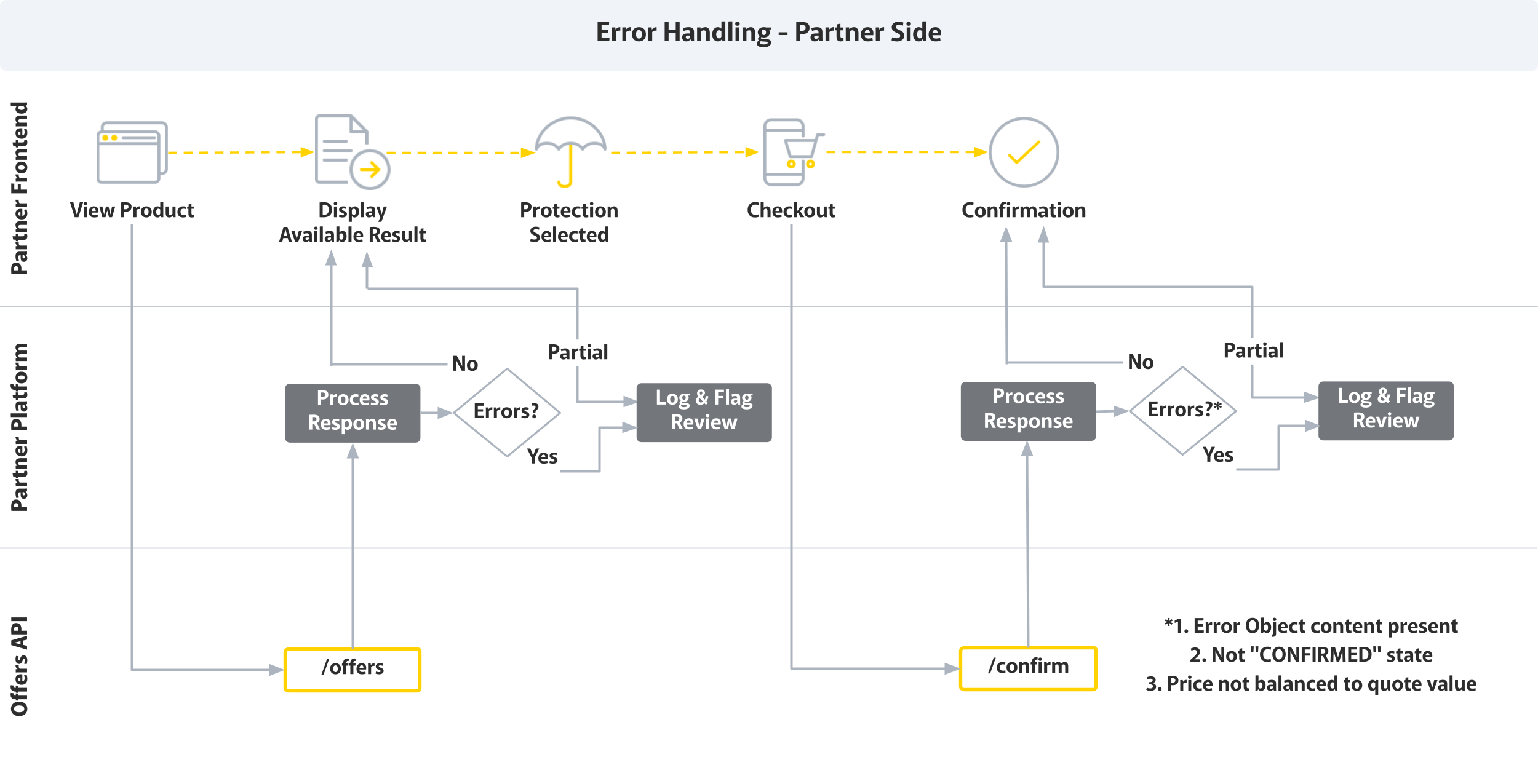
Note the below workflow for error handling:
We strongly recommend the following mechanisms for error handling:
#### **Retry Mechanism**
The request/response goes through various hops between partners and Cover Genius. These may include various networks and servers.
If at any point, the request fails due to network issue for example (e.g. a timeout), partners should try to resend the request at least twice to rule out any intermittent issue.
For asynchronous request situations, retries may be spaced comfortably, ideally 2-5 mins apart before sending out an alert for someone to manually check any issues.
We recommend at least 5 second timeout for confirming Offers, and setting it to 10 seconds or more should be more reliable and not be a problem for customers.
If requests fail, they should be retried with exponential backoff. In case the Offer confirmation failed 5 times, partners should flag and raise with Cover Genius. Similar logic should apply for cancellations.
#### **Alert Mechanism**
If, after the second try partners fail to receive the expected response (received, confirmed etc), it is recommended to establish alert mechanisms that notify responsible teams of the failure.
#### **Logging Mechanism**
Irrespective of a correct or a failed request/response, it is highly recommended for partners to log requests and responses all centrally. These assist investigation where besides direct issue itself, patterns may become visible, helping to identify overarching issues.
---
# Agent Instructions
This documentation is published with GitBook. GitBook is the documentation platform designed so that both humans and AI agents can read, navigate, and reason over technical content effectively. Learn more at gitbook.com.
## Querying This Documentation
If you need additional information that is not directly available in this page, you can query the documentation by asking a question.
Perform an HTTP GET request on the following URL with the `ask` and `goal` query parameters:
```
GET https://partner-docs.covergenius.com/offers/api/responses/error-management.md?ask=&goal=
```
`ask` is the immediate question: it should be specific, self-contained, and written in natural language.
`goal` is what the user is ultimately trying to achieve, the reason they need the answer. Sharing it helps GitBook give you a better, more relevant answer. A goal is most helpful when it describes the outcome the user wants rather than restating the question. For example, with `ask=how do I create an API token`, a goal like `automate deployments from our CI pipeline` lets GitBook tailor the answer to that use case.
The response will contain a direct answer to the question and relevant excerpts and sources from the documentation.
Use this mechanism when the answer is not explicitly present in the current page, you need clarification or additional context, or you want to retrieve related documentation sections.